
Hauler is a game about trains and secrets for 2–4 players. Get your carriages to the front of the train to score points over a few rounds. The first player to 30 points wins!
Select a game mode
When you open Hauler, you'll see the main menu.
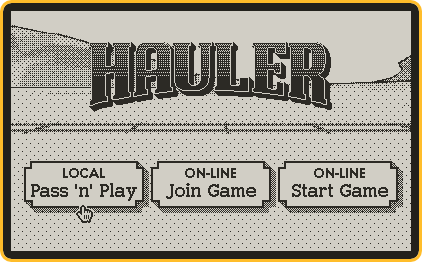
- Local—Pass ’n’ Play: All players share the same Playdate, passing it around between turns.
- On-line—Join Game: Play with another person who’s given you a joining code.
- On-line—Start Game: All players use their own Playdates, which connect to each other using a joining code.
Choose between modes using the D-pad. Select a mode by pressing the A button.
Select player avatars
Choose the avatars you’ll use for each player before starting the game.

- Players: When the game starts, these players will be included.
- Avatars: Each player gets a unique avatar for the duration of the game. Avatars that are already taken by another player can’t be selected.
- GO button: Select this button to start the game. You must have at least two players to start a game.
Choose between avatars and the GO button using the D-pad. Add a player or start the game by pressing the A button.
Remove a player by pressing the B button. Press the B button repeatedly to go back to the main menu.
Playing your turn
On your turn, you’ll see the train and your hand of action cards.

- Train: The carriages on this train start in a random arrangement. Do your best to get your goal carriages to the front of the train (the right-hand side of the train, behind the engine).
- Action cards: These are your personal action cards. Each player receives an identical set of cards at the start of the round.
Choose between action cards using the D-pad. Select a card by pressing the A button.
Once you select an action card, you’ll choose a carriage to play it on.
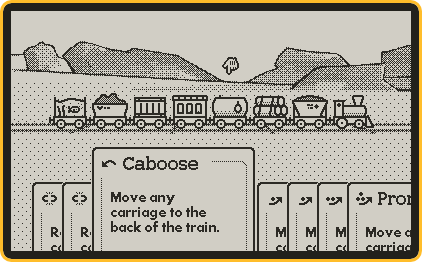
Choose between carriages using the D-pad. Select a carriage and play the action by pressing the A button.
To choose a different card, press the B button.
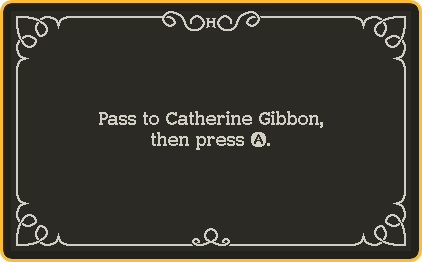
Once you play your action, pass the Playdate to the person indicated on the screen.
Goal carriages
Open the menu at any time during your turn to see your goal carriages.
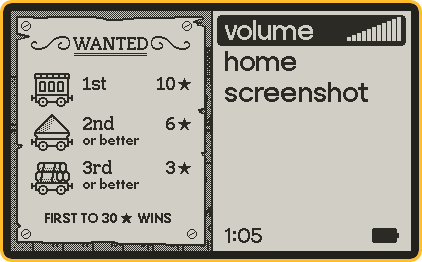
- 1st: If this carriage is in the first position on the train (immediately behind the engine) at the end of the round, you’ll score 10 points.
- 2nd: If this carriage is in the first or second position, you’ll score an additional 6 points.
- 3rd: If this carriage is in the first, second, or third position, you’ll score an additional 3 points.
You might share one or more goal carriages with other players, and they might be in a similar order, but no two players will have exactly the same goal in a single round.
Round replays
At the start of your turn, you’ll see a replay of the actions other players have taken.

- Train: The train will start in the same state as you left it on your last turn, or how it was at the start of the round if it’s your first turn.
- Caption: An explanation of the action being replayed. You’ll see the name of the player, the card they used, and which carriage they used it on.
Pay attention! You may be able to figure out another player’s goal carriages by watching how they play.
Ending a round
The round ends when there are only three carriages left on the train, or all players are out of cards to play. When the screen says, “Gather ‘round”, all players should watch.

- Avatars: Each player’s avatar will appear in the order of play, from left to right.
- Goal carriages: For each player, their 3rd, 2nd, then 1st goal carriage will appear here.
- Scores: For each player, their total score for this game will appear here.
After the scores have been tallied, if no player has reached 30 points, press the A button to start a new round.
Ending the game
The game ends when any player reaches 30 points.

- Avatars: Each player’s avatar will appear in the order of play, from top to bottom.
- Round scores: The number of points each player accumulated in each round, from left to right.
- Total scores: The total score of each player at the end of the game.
Press the A button to go to the main menu.